
As a developer, finding the perfect terminal is an ongoing journey. Recently, I stumbled upon a post about WezTerm while scrolling through X. Intrigued by the positive buzz, I decided to give a try.
There are a bunch of cool features of WezTerm: It is effective, It uses the GPU to render text and graphics, which results in smoother and faster performance. It also has built-in multiplexer, allowing you to manage multiple terminal sessions within a single window. You can split panes horizontally or vertically, and even synchronize input across multiple panes. What truly sets WezTerm apart is its flexibility: configuration is handled through the Lua programming language, enabling highly customizable and programmable settings. This allows you to tailor its appearance and behavior to fit your specific needs, whether it’s adjusting the interface or scripting complex workflows.
Here is my WezTerm
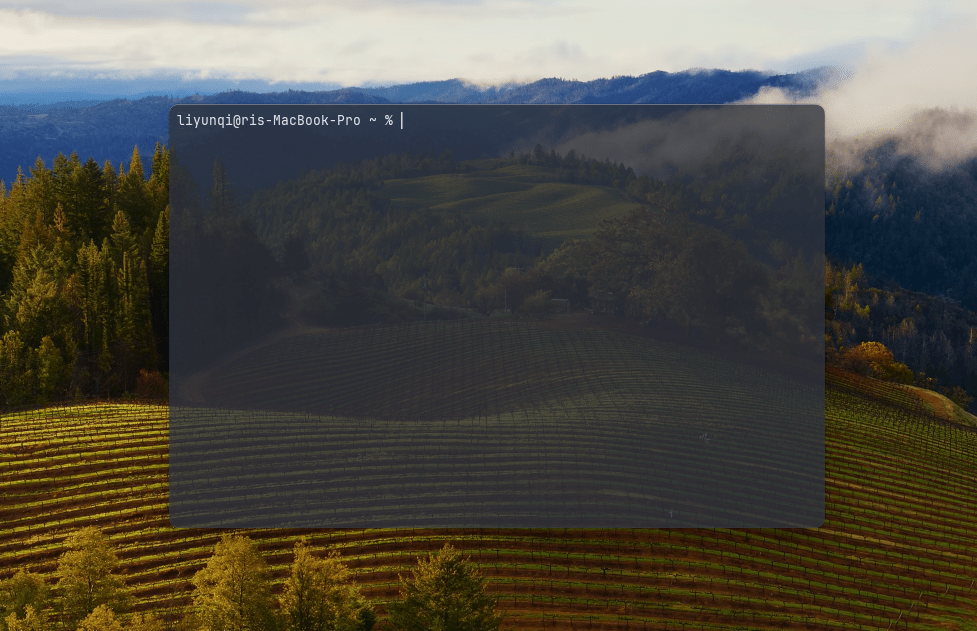
As I mentioned, WezTerm is highly customizable, here is my wezterm.lua, the official website offers detailed instructions. If you find WezTerm interesting and want to take a deep dive, feel free to check it out.
local wezterm = require 'wezterm'

local config = wezterm.config_builder()

config = {
    automatically_reload_config = true,
    enable_tab_bar = false,
    check_for_updates = false,
    window_close_confirmation = "NeverPrompt",
    window_decorations = "RESIZE",
    default_cursor_style = "BlinkingBar",
    color_scheme = "Nord (Gogh)",
    font_size = 12.5,

    background = {
        {
          source = {
            Color = "#282c35",
          },
          width = "100%",
          height = "100%",
          opacity = 0.75,
        },
      },

      keys = {
        { key = "D", mods = "CMD|SHIFT", action = wezterm.action.SplitHorizontal { domain = "CurrentPaneDomain" }},
        { key = "E", mods = "CMD|SHIFT", action = wezterm.action.SplitVertical { domain = "CurrentPaneDomain" } },
        { key = "H", mods = "CMD|SHIFT", action = wezterm.action.ActivatePaneDirection("Left") },
        { key = "L", mods = "CMD|SHIFT", action = wezterm.action.ActivatePaneDirection("Right") },
        { key = "K", mods = "CMD|SHIFT", action = wezterm.action.ActivatePaneDirection("Up") },
        { key = "J", mods = "CMD|SHIFT", action = wezterm.action.ActivatePaneDirection("Down") },
        { key = "W", mods = "CMD|SHIFT", action = wezterm.action.CloseCurrentPane { confirm = false } },
      },
}

return config
In addition to the customized shortcuts above, here are the commands I use most often in my day-to-day usage
| Command + M | minimize WezTerm |
| Command + T | open a new tab |
| Command + W | close current tab |
| Ctrl + Shift + number | switch between tabs |
The above is my short introduction to WezTerm and my experience using it, WezTerm also has some more trending features, such as Syntax highlighting and auto suggestions, if you find it interesting, please feel free to DM me via email or X. I’m looking forward to having a conversation with you.
In the end, it would be great if you can subscribe my blog or buy me a coffee, it will inspire me to create more contents such as sharing more details about job seeking in the future, some tech stuff, and my life. Thanks for reading 😊.
Inspired by Henry Misc
 yunqi's blog
Leave a comment